macOS menu bar · ⌘⇧R
Type what you want to say.
Send the finished reply.
ReplyFive turns a few words into a ready-to-send reply that fits the conversation you are looking at, in the conversation's language. It never sends anything for you, and your message text is never stored on the server.
The app connects with an invite code or connection link from the admin console. Start the trial first, then download.
14 days free, no credit cardmacOS 13 or laterApple silicon & Intel
How it works
Three keys between the thought and the sent message.
No window to switch to, no prompt to write, no copy and paste. ReplyFive sits in the menu bar and works inside the app you are already in.
Press ⌘⇧R
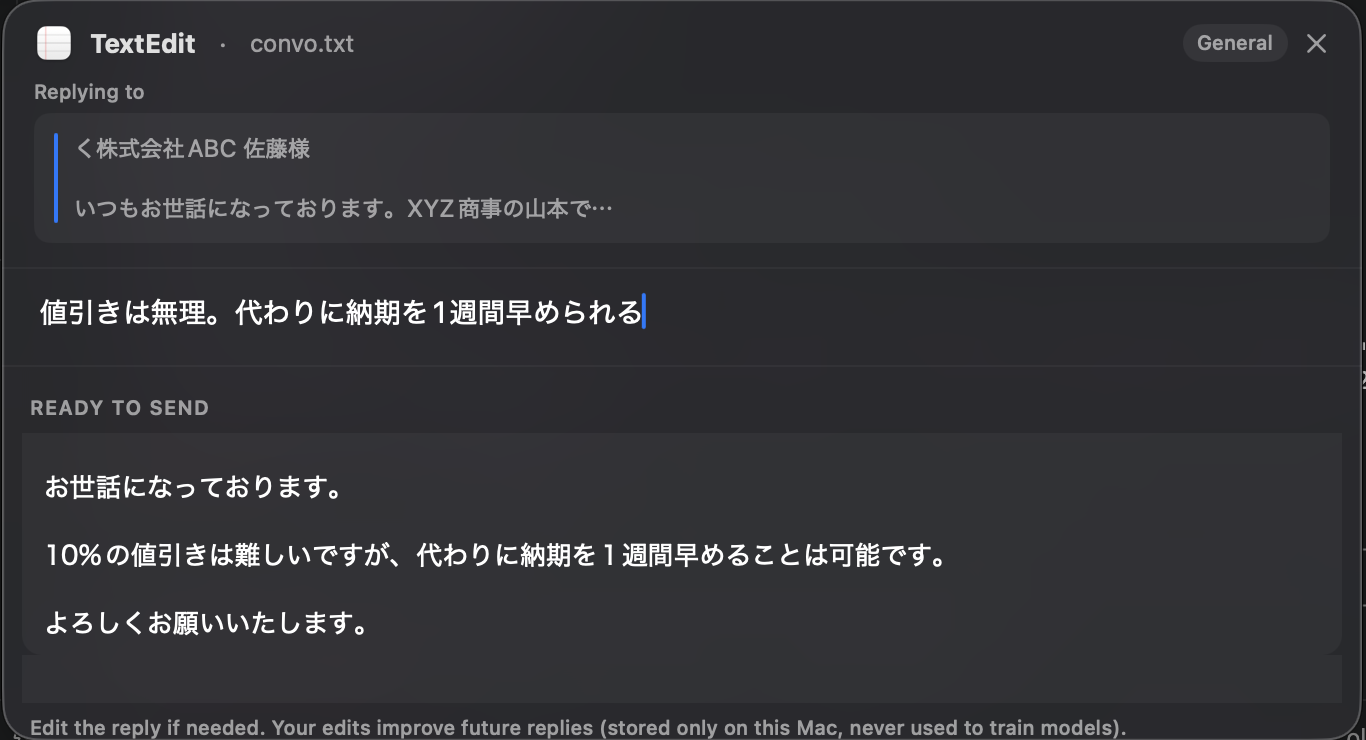
Select the message you are replying to, or just leave the cursor in the reply box. ReplyFive reads the selected message, or the conversation visible in the front window, once at that moment. The panel opens in front of the app you were using, which stays active behind it.
Type the gist
A few words are enough: “No discount. Can ship a week earlier instead.” Pick a tone and who you are writing to if the defaults are not right.
Press Return
The finished reply is written straight into the field you were in, ready for you to read and send. It takes a second or two. ⌥Return opens it for editing first, esc closes without a trace.
Get started
From sign-up to the first reply in four steps.
Nothing to configure on the Mac. The admin console creates your organization, and a link connects the app.
-
Sign in to the admin console
Use Google, Apple, Microsoft or your email address at replyfive.app/admin. Your organization and the 14-day trial are created automatically. No credit card.
-
Download the app
Download for macOS and open it. It asks for the Accessibility permission, which it needs to read the message and to write the reply into your field.
-
Connect with one link
In the admin console, issue an invite code or a connection link (
replyfive://connect?…) and open it on the Mac. The app connects itself. Colleagues get their own link the same way. -
Press ⌘⇧R
In any conversation. Type what you want to say, press Return, read it, send it.
Control
It writes the way your team already writes.
The reply has to be yours, not a generic assistant's. Everything that shapes it is either one keypress away or set once by an administrator.
Every language
The reply comes back in the language of the conversation in front of you. Japanese thread, Japanese reply. No language setting to remember.
Tone in one key
Natural, polite or short. Switch it in the panel when a reply needs to be warmer or needs to be three lines shorter.
Who you are writing to
Customer, partner, colleague or an external contact. The register and the level of formality follow the recipient.
Your writing rules
Required opening, signature block, phrases that must never appear. Set once in the admin console and applied on the server for everyone.
No waiting
A draft written on your Mac appears the moment you stop typing, then the server's version replaces it, usually within a second or two. If the network drops, the draft stays and you can retry.
Your infrastructure, if you prefer
Run it on our cloud, or self-host on your own AWS with Terraform or Docker Compose and Amazon Bedrock in the Tokyo region, so text never leaves your account.
Privacy
Built so there is nothing to leak.
Business conversations are the most sensitive text most people handle. ReplyFive is designed around not keeping them: the server holds what billing needs and nothing else, and the app forgets the conversation the moment the panel closes.
Where your text is processed
Cloud plan. The ReplyFive server runs on AWS in Tokyo. The reply text itself is generated by Groq, a provider located in the United States, using an open-weight model. Before and after generation, TypeSafe, also in the United States, classifies the kind of reply and checks that the result keeps your meaning; its model returns only labels and probabilities, never text. Your text is sent to each of them once, to produce the reply, and is not stored by us.
Self-hosted edition. For companies that cannot send text abroad. The server runs in your own AWS account and uses Amazon Bedrock in the Tokyo region, so nothing leaves your account.
Cloud: AWS Tokyo + Groq and TypeSafe (US)Self-host: Amazon Bedrock, Tokyo
-
Never sends anything by itselfThe reply is written into your field. You read it and press send. ReplyFive never presses a send key, and it never writes a draft you did not ask for.
-
Never stores your message textConversation, intent and generated reply are not written to the database and not written to the logs, on our cloud or on your own server.
-
Never watches your screenThe app reads the selected message, or the conversation visible in the front window, only at the moment you press the shortcut. There is no background monitoring, no screenshots, no history.
-
Stores only what billing needsOrganization, subscription, seats, hashed device tokens and a daily request count. That is the whole list.
-
Learning is off until you turn it onIf you switch it on, up to 30 of your own edits are kept encrypted on your Mac only, so the wording drifts towards yours.
Pricing
One price per seat. Cancel any time.
Prices are in Japanese yen and exclude tax; consumption tax is added. The trial runs for 14 days without a credit card. To prevent overuse, each seat is limited to 200 replies per day.
Personal
¥980¥9,800
per month, 1 seat, excl. taxper year, 1 seat, excl. tax
10 months' price for 12
For one person who answers a lot of messages.
- Every language, the apps you already use
- Tone and recipient control
- Optional on-device learning
Team
¥1,500¥15,000
per seat, per month, excl. taxper seat, per year, excl. tax
10 months' price for 12
Everything in Personal, plus the admin console.
- Seat management and invite links
- Shared writing rules
- Single sign-on (OIDC)
- Invoice or bank transfer on request
Business
50+ seats
Annual, billed by invoice
For rollouts across a whole department or company.
- Invoice billing in Japanese yen
- Annual term
- Onboarding for the whole team
Self-hosted
¥30,000
per seat, per year, excl. tax
from 20 seats, annual licence
- 20–50 seats¥30,000
- 51–200 seats¥25,000
- 201–500 seats¥22,500
- 501+ seatsby quote
- Setup support ¥300,000, one time
- Maintenance 20% of licence a year, SLA support 40%
- Model usage billed to your own AWS account
All prices exclude consumption tax, which is added to every invoice. Seats can be added or removed from the admin console. Increases are prorated for the remaining period; decreases apply immediately and use the new price on the next invoice.
Team plans can be billed by invoice or bank transfer on request. Contact us before you subscribe.
Self-hosted runs on your own AWS with Terraform or on Docker Compose, using Amazon Bedrock in Tokyo so conversation text stays inside your account.
Questions
The things people ask before they install it.
Which apps does it work in?
Gmail, Outlook, Slack, Microsoft Teams, Chatwork, LINE, LINE WORKS, Google Chat and other text fields on macOS. In most apps the finished reply is inserted directly into the field you were in.
Some apps do not accept direct insertion. There, ReplyFive falls back to a ⌘V paste and tells you so, so you know what happened. Windows and Linux versions are in development and not available yet.
Does it ever send a message on my behalf?
No. ReplyFive writes the finished reply into the field you were typing in and stops there. Pressing send is always your decision, and there is no setting that changes this. It also never leaves drafts in your mailbox or chat app.
Where is my text processed?
On the cloud plan, the ReplyFive server runs on AWS in Tokyo. The reply text itself is generated by Groq, a provider located in the United States, using an open-weight model. A second US provider, TypeSafe, classifies what kind of reply you need and verifies that the result keeps your meaning; it returns labels and probabilities only. Your text is sent to each provider once to produce the reply. The ReplyFive server does not keep it, and Groq's terms do not permit training on it.
If your policy does not allow text to leave Japan, use the self-hosted edition. It runs in your own AWS account with Amazon Bedrock in the Tokyo region, so nothing leaves your account.
Is my conversation text stored anywhere?
No. The conversation, what you typed and the generated reply are never written to a database or to a log file. The server keeps only what billing requires: your organization, the subscription and seat count, hashed device tokens and a daily request count.
The app discards everything when the panel closes.
Which languages does it write in?
All of them. ReplyFive replies in the language of the conversation you are looking at, so a Japanese thread gets a Japanese reply and a German thread gets a German one. There is no language to select, and nothing to change when you switch between them during the day.
Why does it need the Accessibility permission?
Two reasons, both at the moment you press ⌘⇧R: to read the message you are replying to, and to write the finished reply directly into the field you were in. macOS puts both behind the Accessibility permission. The app reads only at that moment. It does not monitor your screen in the background, and it takes no screenshots.
Is there a Windows or Linux version?
Not yet. ReplyFive is a macOS menu-bar app today, for macOS 13 and later on Apple silicon and Intel. Windows and Linux clients are in development and will talk to the same server, so a team that starts now does not need to migrate anything later.
Can we run it on our own infrastructure?
Yes. The server is a single binary. You can deploy it on your own AWS account with the supplied Terraform, or with Docker Compose, using Amazon Bedrock in Tokyo as the model so conversation text never leaves your account. The licence is annual, from 20 seats, and verified offline. Contact us to arrange it.
Can we pay by invoice or bank transfer?
The Business plan (50 seats and more) is always billed by invoice. For the Team plan, invoice or bank transfer is available on request: email us before you subscribe and we will set it up.
How do I cancel?
From the admin console, at any time. Monthly and annual plans renew automatically; a cancellation takes effect at the end of the current period, and the remaining period is not refunded. The trial lasts 14 days, needs no credit card, and ends by itself if you do nothing.
Stop rewriting the same reply.
Fourteen days, no credit card, and it works in the apps you already use.
The app needs an invite code or connection link from the admin console to connect.
macOS 13 or laterAccessibility permission required